
GPS Map Polaroid camera: Add geotag & timestamp1.0.1 - Google Play
You'll be able to see results in few seconds.
Publisher Description
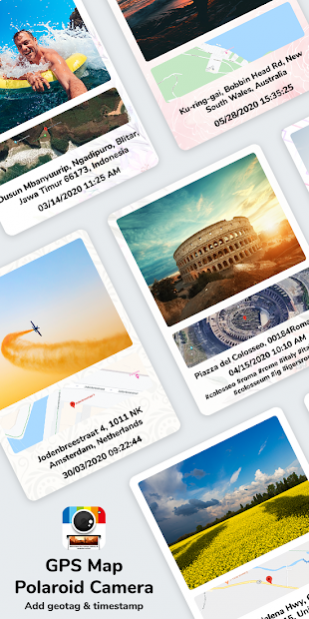


Whether 90’s Vintage camera photos or recent Insta style photos, Polaroid Camera has proved it’s definite place in the Photographic world. During the 90's people used to have printed photos and mention their signature, date, memorable moment in words on white space below the polaroid photo.
So here is an App which will give you polaroid camera style poly square photos along with today’s insta style hashtags to write on photo itself along with Timestamp and Location mentions.
How *GPS Map Polaroid camera: Add geotag & timestamp* Application works?
✿ GPS map Polaroid camera to click photos exactly similar to 90’s polaroid prints in square
✿ Select frame from multiple available options
✿ Get GPS location Map stamp on photo
✿ Add Hashtags manually or select from given options
✿ Add today’s date and time stamp on photo
✿ Add auto location stamp on photo
Interesting Features:
✸ Polaroid Camera - to click square size photos
✸ Cool Frames - for designed and colorful background
✸ Date Timestamp - To get current Datetime on Photo
✸ Location Stamp - to mention location on photo
✸ GPS Map - In Normal, Satellite, Terrain, Hybrid types
✸ Hashtags - To get relatable hashtags on photo itself.
Why to have *GPS Map Polaroid camera: Add geotag & timestamp* in your Smartphone?
✤ To enjoy 90’s polaroid style photos with application now
✤ To get photo caption added on photo
✤ Have polaroid frame to add text on pictures
✤ Works as Timestamp camera on polaroid filter
✤ Write on picture as like people used to add text on photos
✤ Watermark photos with Hashtags, date time stamp, geo-location & Map
Download the Application and enjoy it as a Polaroid filter got added digitally. Simple and easy photo experience for all your memorable trips and moments. All different features as per trends of the 90's and trends running in present at one place, one application.
About GPS Map Polaroid camera: Add geotag & timestamp
The company that develops GPS Map Polaroid camera: Add geotag & timestamp is All Excellent Apps. The latest version released by its developer is 1.0.1.
To install GPS Map Polaroid camera: Add geotag & timestamp on your Android device, just click the green Continue To App button above to start the installation process. The app is listed on our website since 2020-07-01 and was downloaded 0 times. We have already checked if the download link is safe, however for your own protection we recommend that you scan the downloaded app with your antivirus. Your antivirus may detect the GPS Map Polaroid camera: Add geotag & timestamp as malware if the download link to com.polaroidcamerastamp.addtextonpolaroidphotos is broken.
How to install GPS Map Polaroid camera: Add geotag & timestamp on your Android device:
- Click on the Continue To App button on our website. This will redirect you to Google Play.
- Once the GPS Map Polaroid camera: Add geotag & timestamp is shown in the Google Play listing of your Android device, you can start its download and installation. Tap on the Install button located below the search bar and to the right of the app icon.
- A pop-up window with the permissions required by GPS Map Polaroid camera: Add geotag & timestamp will be shown. Click on Accept to continue the process.
- GPS Map Polaroid camera: Add geotag & timestamp will be downloaded onto your device, displaying a progress. Once the download completes, the installation will start and you'll get a notification after the installation is finished.
Program Details
System requirements
Download information
Pricing
Version History
version 1.0.1
posted on 2020-07-01
✸ Polaroid Camera - to click square size photos
✸ Cool Frames - for designed and colorful background
✸ Date Timestamp - To get current Datetime on Photo
✸ Location Stamp - to mention location on photo
✸ GPS Map - In Normal, Satellite, Terrain, Hybrid types
✸ Hashtags - To get relatable hashtags on photo itself.
Disclaimer
Official Google Play Link
We do not host GPS Map Polaroid camera: Add geotag & timestamp on our servers. We did not scan it for viruses, adware, spyware or other type of malware. This app is hosted by Google and passed their terms and conditions to be listed there. We recommend caution when installing it.
The Google Play link for GPS Map Polaroid camera: Add geotag & timestamp is provided to you by apps112.com without any warranties, representations or guarantees of any kind, so access it at your own risk.
If you have questions regarding this particular app contact the publisher directly. For questions about the functionalities of apps112.com contact us.
